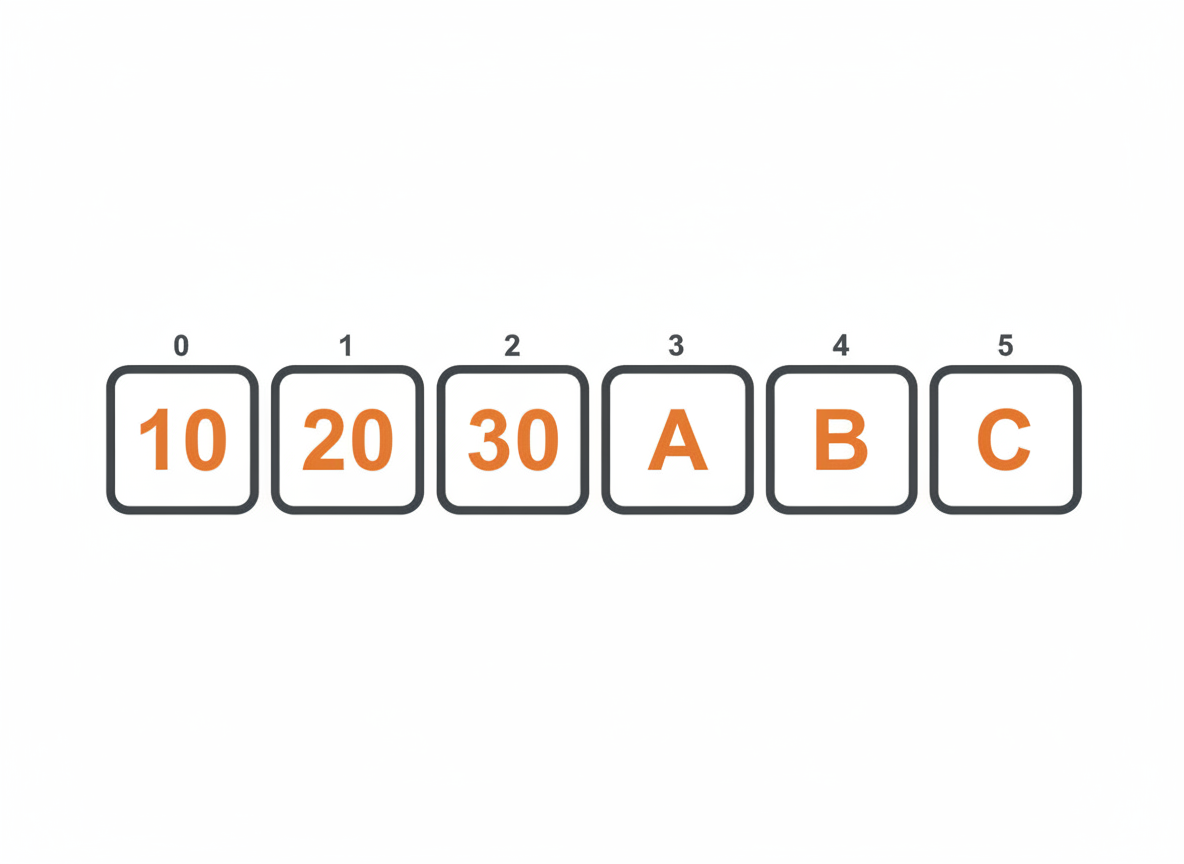
A single variable holds one value. But programs often work with collections: a list of names, a series of test scores, a set of temperatures. Arrays store multiple values of the same type in a single structure.
Creating Arrays
An array declaration specifies the type of elements it holds, followed by square brackets.
int[] numbers;
String[] names;
double[] prices;
This declares array variables but doesn’t create the arrays themselves. To create an array, use new with a size:
int[] numbers = new int[5];      // Array of 5 integers
String[] names = new String[3];  // Array of 3 strings
double[] prices = new double[10]; // Array of 10 doubles
The size is fixed when the array is created. An array of 5 elements stays at 5 elements. You can’t add or remove slots later.
Array Literals
If you know the values upfront, use an array literal:
int[] scores = {85, 92, 78, 90, 88};
String[] days = {"Mon", "Tue", "Wed", "Thu", "Fri"};
double[] rates = {1.5, 2.0, 2.5};
Java determines the size from the number of values you provide. The scores array has 5 elements, days has 5, and rates has 3.
Accessing Elements
Array elements are accessed by index, starting at 0.
String[] colors = {"red", "green", "blue"};

System.out.println(colors[0]);  // red
System.out.println(colors[1]);  // green
System.out.println(colors[2]);  // blue
The first element is at index 0, the second at index 1, and so on. For an array of size n, valid indices are 0 through n-1.
Accessing an invalid index throws an ArrayIndexOutOfBoundsException:
String[] colors = {"red", "green", "blue"};
System.out.println(colors[3]);  // Exception! Valid indices are 0, 1, 2
Modifying Elements
Assign values to specific positions using the index:
int[] scores = new int[3];

scores[0] = 85;
scores[1] = 92;
scores[2] = 78;

System.out.println(scores[1]);  // 92

scores[1] = 95;  // Change the value
System.out.println(scores[1]);  // 95
Array Length
Every array has a length property (not a method, so no parentheses):
int[] numbers = {10, 20, 30, 40, 50};
System.out.println(numbers.length);  // 5
Use length to avoid hardcoding array sizes:
int lastIndex = numbers.length - 1;
System.out.println(numbers[lastIndex]);  // 50
Default Values
When you create an array with new, Java initializes elements to default values:
- Numeric types (int, double, etc.): 0
- boolean: false
- Object references (String, etc.): null
int[] nums = new int[3];
System.out.println(nums[0]);  // 0

boolean[] flags = new boolean[2];
System.out.println(flags[0]);  // false

String[] words = new String[2];
System.out.println(words[0]);  // null
Looping Through Arrays
The most common array operation is processing every element.
Traditional for Loop
int[] scores = {85, 92, 78, 90, 88};

for (int i = 0; i < scores.length; i++) {
    System.out.println("Score " + i + ": " + scores[i]);
}
Output:
Score 0: 85
Score 1: 92
Score 2: 78
Score 3: 90
Score 4: 88
Use the traditional for loop when you need the index or want to modify elements.
Enhanced for Loop
int[] scores = {85, 92, 78, 90, 88};

for (int score : scores) {
    System.out.println(score);
}
The enhanced for loop is cleaner when you just need each value. You don’t get the index, but often you don’t need it.
Common Array Operations
Finding the Sum
int[] numbers = {10, 20, 30, 40, 50};
int sum = 0;

for (int num : numbers) {
    sum += num;
}

System.out.println("Sum: " + sum);  // Sum: 150
Finding the Average
int[] scores = {85, 92, 78, 90, 88};
int sum = 0;

for (int score : scores) {
    sum += score;
}

double average = (double) sum / scores.length;
System.out.println("Average: " + average);  // Average: 86.6
Finding Maximum and Minimum
int[] numbers = {23, 45, 12, 67, 34};

int max = numbers[0];
int min = numbers[0];

for (int num : numbers) {
    if (num > max) {
        max = num;
    }
    if (num < min) {
        min = num;
    }
}

System.out.println("Max: " + max);  // Max: 67
System.out.println("Min: " + min);  // Min: 12
Searching for a Value
String[] names = {"Alice", "Bob", "Charlie", "Diana"};
String target = "Charlie";
int foundIndex = -1;

for (int i = 0; i < names.length; i++) {
    if (names[i].equals(target)) {
        foundIndex = i;
        break;
    }
}

if (foundIndex >= 0) {
    System.out.println("Found at index: " + foundIndex);
} else {
    System.out.println("Not found");
}
Counting Occurrences
int[] grades = {85, 90, 78, 90, 92, 90, 88};
int target = 90;
int count = 0;

for (int grade : grades) {
    if (grade == target) {
        count++;
    }
}

System.out.println(target + " appears " + count + " times");  // 90 appears 3 times
Arrays and Methods
Arrays can be passed to methods and returned from methods.
Passing Arrays to Methods
public class ArrayMethods {
    public static void main(String[] args) {
        int[] numbers = {10, 20, 30, 40, 50};

        int total = sum(numbers);
        System.out.println("Sum: " + total);

        printArray(numbers);
    }

    public static int sum(int[] arr) {
        int total = 0;
        for (int num : arr) {
            total += num;
        }
        return total;
    }

    public static void printArray(int[] arr) {
        for (int i = 0; i < arr.length; i++) {
            System.out.print(arr[i]);
            if (i < arr.length - 1) {
                System.out.print(", ");
            }
        }
        System.out.println();
    }
}
When you pass an array to a method, you pass a reference to the array. Changes made inside the method affect the original array.
public static void main(String[] args) {
    int[] values = {1, 2, 3};
    doubleAll(values);

    for (int v : values) {
        System.out.print(v + " ");  // 2 4 6
    }
}

public static void doubleAll(int[] arr) {
    for (int i = 0; i < arr.length; i++) {
        arr[i] = arr[i] * 2;
    }
}
This differs from primitive variables, which are copied. Arrays are objects, and methods receive a reference to the same underlying data.
Returning Arrays from Methods
public static int[] createRange(int start, int end) {
    int size = end - start + 1;
    int[] result = new int[size];

    for (int i = 0; i < size; i++) {
        result[i] = start + i;
    }

    return result;
}

public static void main(String[] args) {
    int[] range = createRange(5, 10);

    for (int num : range) {
        System.out.print(num + " ");  // 5 6 7 8 9 10
    }
}
The Arrays Utility Class
Java provides a utility class with helpful array methods. Import it with import java.util.Arrays;
Printing Arrays
import java.util.Arrays;

int[] numbers = {5, 2, 8, 1, 9};
System.out.println(Arrays.toString(numbers));  // [5, 2, 8, 1, 9]
Without Arrays.toString(), printing an array directly shows something like [I@6d06d69c, which is the array’s memory reference.
Sorting Arrays
int[] numbers = {5, 2, 8, 1, 9};
Arrays.sort(numbers);
System.out.println(Arrays.toString(numbers));  // [1, 2, 5, 8, 9]
Sorting modifies the original array.
Filling Arrays
int[] numbers = new int[5];
Arrays.fill(numbers, 42);
System.out.println(Arrays.toString(numbers));  // [42, 42, 42, 42, 42]
Comparing Arrays
int[] a = {1, 2, 3};
int[] b = {1, 2, 3};
int[] c = {1, 2, 4};

System.out.println(Arrays.equals(a, b));  // true
System.out.println(Arrays.equals(a, c));  // false
Don’t use == to compare arrays. It compares references, not contents.
Copying Arrays
int[] original = {1, 2, 3, 4, 5};
int[] copy = Arrays.copyOf(original, original.length);

copy[0] = 99;
System.out.println(Arrays.toString(original));  // [1, 2, 3, 4, 5]
System.out.println(Arrays.toString(copy));      // [99, 2, 3, 4, 5]
The copy is independent of the original.
Multidimensional Arrays
Arrays can contain arrays, creating grids or tables.
int[][] grid = new int[3][4]; // 3 rows, 4 columnsOr with an array literal:
int[][] matrix = {
    {1, 2, 3},
    {4, 5, 6},
    {7, 8, 9}
};
Access elements with two indices:
System.out.println(matrix[0][0]);  // 1 (first row, first column)
System.out.println(matrix[1][2]);  // 6 (second row, third column)
System.out.println(matrix[2][1]);  // 8 (third row, second column)
Loop through with nested loops:
for (int row = 0; row < matrix.length; row++) {
    for (int col = 0; col < matrix[row].length; col++) {
        System.out.print(matrix[row][col] + " ");
    }
    System.out.println();
}
Output:
1 2 3
4 5 6
7 8 9
Practical Example
Here’s a grade tracker that uses arrays:
import java.util.Arrays;
import java.util.Scanner;

public class GradeTracker {
    public static void main(String[] args) {
        Scanner scanner = new Scanner(System.in);

        System.out.print("How many students? ");
        int count = scanner.nextInt();

        int[] grades = new int[count];

        for (int i = 0; i < count; i++) {
            System.out.print("Enter grade for student " + (i + 1) + ": ");
            grades[i] = scanner.nextInt();
        }

        System.out.println();
        System.out.println("Grade Report");
        System.out.println("------------");
        System.out.println("Grades: " + Arrays.toString(grades));
        System.out.println("Average: " + calculateAverage(grades));
        System.out.println("Highest: " + findMax(grades));
        System.out.println("Lowest: " + findMin(grades));
        System.out.println("Passing: " + countPassing(grades, 60));

        scanner.close();
    }

    public static double calculateAverage(int[] arr) {
        int sum = 0;
        for (int num : arr) {
            sum += num;
        }
        return (double) sum / arr.length;
    }

    public static int findMax(int[] arr) {
        int max = arr[0];
        for (int num : arr) {
            if (num > max) max = num;
        }
        return max;
    }

    public static int findMin(int[] arr) {
        int min = arr[0];
        for (int num : arr) {
            if (num < min) min = num;
        }
        return min;
    }

    public static int countPassing(int[] arr, int threshold) {
        int count = 0;
        for (int num : arr) {
            if (num >= threshold) count++;
        }
        return count;
    }
}
Common Mistakes
Off-by-one errors. Array indices run from 0 to length-1. Using <= instead of < in a loop condition causes an exception.
// Wrong - accesses index 5, which doesn't exist
for (int i = 0; i <= arr.length; i++)

// Correct
for (int i = 0; i < arr.length; i++)
Confusing length property with length() method. Arrays use .length (no parentheses). Strings use .length() (with parentheses).
Comparing arrays with ==. Use Arrays.equals() to compare contents.
Forgetting arrays are fixed size. You can’t add elements to an existing array. Use ArrayList if you need a resizable collection.
Null pointer exceptions. Elements in object arrays default to null. Check before using.
What’s Next
Arrays have a fixed size. ArrayList provides a flexible alternative that grows and shrinks as needed. The next tutorial covers ArrayList and introduces Java’s collections framework.
Related: Java Methods: Writing Reusable Code | ArrayList in Java
Sources
- Oracle. “Arrays.” The Java Tutorials. docs.oracle.com
- Oracle. “Arrays (Java SE 21).” Java Documentation. docs.oracle.com